
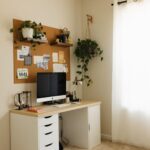







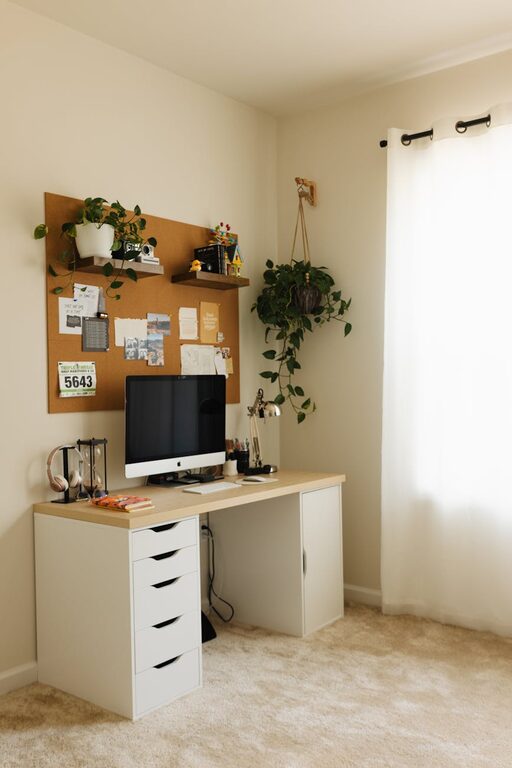
Creating a home workspace that balances relaxation and productivity is essential for anyone working remotely or managing tasks at home. The right environment can help you focus better, reduce stress, and maintain a healthy work-life balance. This guide offers practical tips and ideas to transform any corner of your home into a comfortable and efficient workspace.
1. Choose the Right Location
Selecting the perfect spot for your workspace sets the foundation for your productivity and comfort.
Consider Natural Light
Places near windows with plenty of daylight can improve your mood and energy levels. Natural light reduces eye strain and helps regulate your body’s natural rhythms.
Minimize Distractions
Look for a quiet area away from household noise, high traffic zones, or busy spaces. This helps maintain concentration during work hours.
Think About Privacy
Especially if you have family members or roommates, choose a space that provides some privacy to avoid interruptions during meetings or focused tasks.
2. Invest in Comfortable and Functional Furniture
The furniture you use plays a major role in both comfort and productivity.
Ergonomic Office Chair
A chair with good lumbar support prevents back pain and promotes better posture. Adjustable height and armrests allow customization to your body type.
Desk with Enough Surface Area
Choose a desk that fits your computer, documents, and other work essentials without feeling cramped. Consider desks with built-in storage or cable management to keep it tidy.
Optional Additions
A footrest, monitor stands, or an adjustable laptop table can further enhance comfort and reduce strain during long work sessions.
3. Optimize Lighting for Comfort and Focus
Proper lighting reduces eye fatigue and helps you stay alert.
Use Soft, Warm Lighting
While natural light is ideal, supplement with soft, warm light bulbs to create a calm atmosphere. Avoid harsh fluorescent lights.
Adjustable Desk Lamps
Task lighting lets you control the brightness exactly where you need it, particularly useful for reading or detailed work.
Avoid Screen Glare
Position your monitor perpendicular to windows and light sources to reduce glare and reflections that can cause discomfort.
4. Organize Your Workspace Efficiently
Clutter can distract and increase stress, so keeping your area tidy is key.
Utilize Storage Solutions
Use shelves, drawers, or bins to store documents and supplies neatly. Labeling helps you find what you need quickly.
Keep Only Essentials on Your Desk
Limit desk items to daily use tools such as your computer, notebook, pens, and a water bottle to maintain clarity.
Digital Organization
Keep your computer desktop and files organized. Regularly back up data and remove unnecessary files to prevent digital clutter.
5. Incorporate Personal and Calming Elements
Adding touches that make you feel relaxed can improve your mood and creativity.
Plants and Greenery
Indoor plants improve air quality and bring a natural, soothing element into your workspace.
Personal Accessories
Photos, artwork, or small objects that inspire you can make your space feel welcoming without becoming distracting.
Aromatherapy
Scents like lavender or eucalyptus through diffusers or candles can create a calming environment. Always consider safety and ventilation when using these.
6. Set Boundaries for Work and Relaxation
Maintaining a clear separation between work time and personal time helps avoid burnout.
Define Work Hours
Create a routine with specific start and end times. Communicate these to household members.
Signal Transitions
Closing your laptop, tidying your desk, or turning off work-related notifications can help your brain switch from work mode to relaxation.
Create a Zone
If possible, designate a specific area exclusively for work. Avoid using your workspace for leisure activities.
7. Use Technology Wisely
Technology is essential, but managing it effectively prevents distraction.
Reliable Internet and Equipment
Invest in good internet connectivity and quality equipment to prevent frustrations.
Noise-Canceling Headphones
These can block out background noise when needed, helping maintain focus.
Productivity Apps
Tools for time management, task lists, and breaks can improve efficiency and balance.
8. Prioritize Comfort and Movement
Long periods of sitting can affect health and focus.
Take Regular Breaks
Follow techniques like the Pomodoro method — work for 25 minutes, then take a 5-minute break.
Stretch and Move
Incorporate light stretching or short walks to reduce stiffness and improve circulation.
Maintain Comfortable Temperature
Ensure the room temperature supports focus and comfort, neither too hot nor too cold.
—
By thoughtfully arranging your home workspace, you can create an environment that fosters both relaxation and productivity. Whether you have a dedicated room or a small nook, following these tips will help you design a space that works for you and supports your daily tasks with ease. Take the time to adjust and personalize your setup as your needs evolve for the best results.